Showing posts with label Android tips. Show all posts

Tuesday, May 20, 2014

[Android Tips] สารพันปัญหา Google Map API


1. Google Map ดันไปอยู่ใน Scroll View


ปัญหาที่เกิด คือ เราจะ touch map ไม่ได้ (touch แล้วมันจะเลื่อน scroll)
แก้ปัญหาด้วยการ
1. นำ View มาใส่ไว้บน Google Map แล้วใส่ touch event ให้ View นั้นๆ
2. เมื่อมีการ touch View นั้นๆ ให้ scroll view เรียกใช้คำสั่ง .requestDisallowInterceptTouchEvent(true);


ดังโค้ดต่อไปนี้

XML


Java
View view= (View) findViewById(R.id.view);
view.setOnTouchListener(new OnTouchListener() {
        @Override
        public boolean onTouch(View v, MotionEvent event) {
                scrollView.requestDisallowInterceptTouchEvent(true);
                return false;
        }
});


2. Google Map เลื่อนแล้ว Background เป็นสีดำ
แก้ปัญหาด้วยการเอา View มาทับแล้วให้ android:background="@android:color/transparent"


[Android Tips] เว็บรวม Library สำหรับพัฒนา Application บน Android


http://android-arsenal.com/
http://www.appbrain.com/stats/libraries/dev

Monday, May 19, 2014

[Android Tips] EditText เมื่อกรอกข้อมูลผ่านไปแล้ว xxxx วินาที จึง...

เวลาเรากรอกข้อความใน EditText และเมื่อเวลาผ่านไป xxxx วินาที แล้วเราต้องการให้ doSomeThing

ตัวอย่างโค้ด
EditText ed = (EditText) findViewById(R.id.ed_start);
ed .addTextChangedListener(new TextWatcher() {

 @Override
 public void onTextChanged(CharSequence s, int start, int before, int count) {
 }

 @Override
 public void beforeTextChanged(CharSequence s, int start, int count, int after) {
 }

 private Timer timerStart = new Timer();

 @Override
 public void afterTextChanged(final Editable s) {
  timerStart.cancel();
  timerStart = new Timer();
  timerStart.schedule(new TimerTask() {
   @Override
   public void run() {
    ...
   }

  }, XXXX_MILLISEC);
 }
});

Monday, May 12, 2014

[Android Tips] รวมเว็บ UI Inspiration ของ Android


http://android.inspired-ui.com/
http://www.android-app-patterns.com
http://androidniceties.tumblr.com/
http://theultralinx.com
http://www.pinterest.com/mnies/ios-7android-ui-inspiration/
http://www.designyourway.net
http://mobiledesigninspiration.tumblr.com/

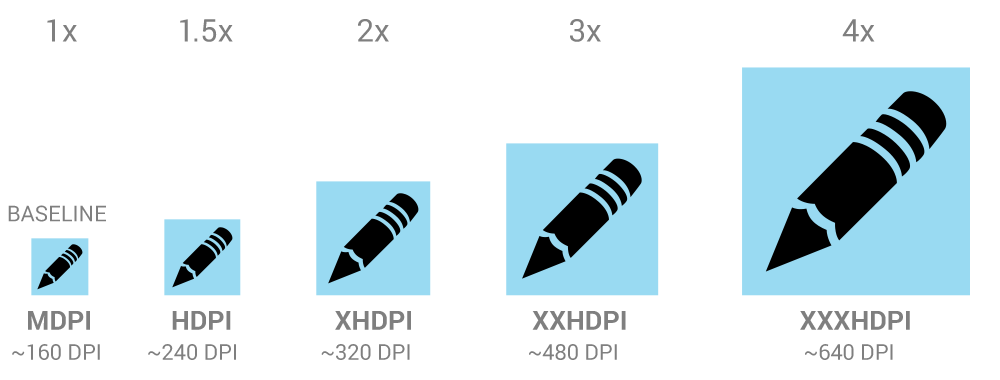
[Android Tips] มาว่ากันด้วยเรื่องขนาดหน้าจอและไอคอน


เว็บ Android Design Tips : http://www.androiddesign.tips/
เว็บ Convert จาก Px to DP : http://www.designbyexperience.com/px-to-dp-converter/ 


ขออ้างอิงบทความจากพี่เอกนะครับ ซึ่งพี่เค้าแปลและอธิบายได้เข้าใจง่ายดี
[Android Design] เคล็ดไม่ลับกับภาพ Drawable Resource สำหรับรองรับหน้าจอหลายขนาด
[Android Design] ว่าด้วยเรื่อง Size และ Density ของหน้าจอ
[Android Design] แท้จริงแล้วหน่วย dp คืออะไร?


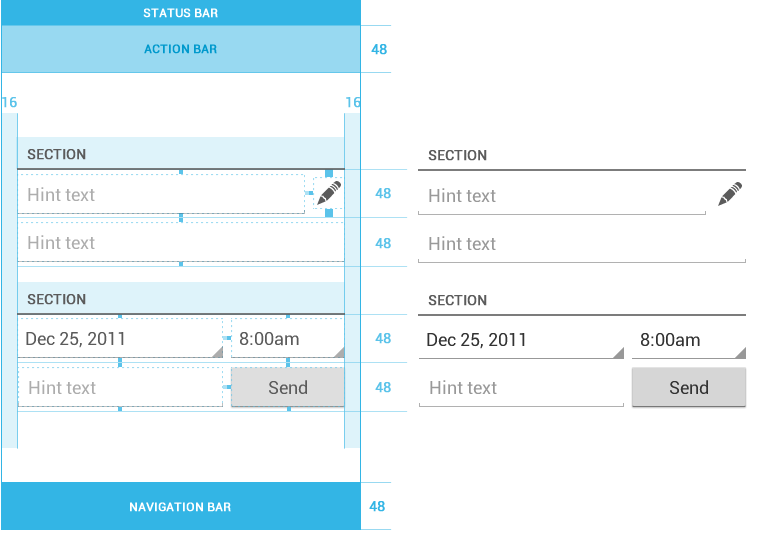
48dp Rhythm คือ ขนาดที่เหมาะสมที่นิ้วมือเราจะสัมผัสได้อย่างแม่นยำ
Android แนะนำให้แต่ละ UI Element มีช่องไฟ (gaps) ระหว่างกัน 8dp
รายละเอียดเพิ่มเติม : https://developer.android.com/design/style/metrics-grids.html#48dp-rhythm

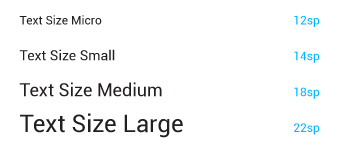
ขนาดตัวอักษร

ขนาด Icon
รายละเอียดเรื่อง ขนาด Icon : https://developer.android.com/design/style/iconography.html
เว็บสำหรับ Generate Icon ขนาดต่างๆ : http://android-ui-utils.googlecode.com/hg/asset-studio/dist/icons-launcher.html


Friday, May 9, 2014

[Android Tips] วิธีการทำให้ Theme.AppCompat NoActionBar


โดยเข้าไปแก้ที่ res/values/styles.xml


[Android Tips] การใช้ HttpClient ในการอับโหลดรูป หรือ อับโหลดวิดีโอ

วันนี้ผมจะมานำเสนอวิธีการเขียนโค้ดอับโหลดรูป หรือ อับโหลดวิดีโอ จากเจ้า Android ขึ้นสู่ยอดเสา เอ้ย!! ขึ้น Server กันนะครับ

โดยพระเอกหลักของงานนี้ คือ Class HttpClient ครับ ซึ่งเป็น Free library จาก Apache ครับ
รายละเอียดเพิ่มเติม : http://hc.apache.org/index.html

Step ที่ 1 ต้องมี HttpClient library ก่อนครับ โดยไป Download จากลิงค์ด้านบนได้เลยครับ เมื่อแตก .zip ออกมาจะอยู่ใน folder lib ครับ จะเห็นไฟล์ตามรูปนี้ครับ
ให้ copy 3 ไฟล์ที่ขีดเส้นสีแดงไปไว้ใน folder libs ใน Project ของเราครับ

Step ที่ 2 เริ่ม Coding กันเลย
**ขอข้ามเรื่อง UI กับ การใช้ Intent ไปเลยนะครับ สามารถไปดูได้ในบทความที่ผ่านมาครับ
[Android Tips] วิธีเรียกใช้ Intent เพื่อเลือกรูปภาพหรือวีดิโอ

ก่อนอื่นสร้าง Classs Uploader ซึ่งเป็น AsyncTask ขึ้นมาก่อนนะครับ
อะไรคือ AsyncTask : http://devahoy.com/2014/05/android-asynctask-tutorial/
public class Uploader extends  AsyncTask<Object, Void, String> { 
   
        ProgressDialog progressDialog; 
   
        @Override
        protected void onPostExecute(String result) {
            super.onPostExecute(result); 
               
                progressDialog.dismiss(); 
            if (result != null) { 
                Toast.makeText(getApplicationContext(), "Response :" + result, Toast.LENGTH_LONG).show(); 
   
            } 
        } 
   
        @Override
        protected void onPreExecute() { 

            progressDialog = ProgressDialog.show(MainActivity.this, "", "Uploading video.. "); 
            super.onPreExecute(); 
        } 
   
        @Override
        protected String doInBackground(String... params) { 
            String result_data = ""; 
            String url = "Enter URL here"; 
            try { 
                HttpClient httpclient = new DefaultHttpClient(); 
                HttpPost httppost = new HttpPost(url); 
 
 
                /*** วิดีโอใช้ Code นี้ ***/
                File input = new File(params[0]); 
                FileBody filebodyVideo = new FileBody(input); 
                StringBody title = new StringBody(params[0]); 
                StringBody username = new StringBody(urUname); 
                StringBody password = new StringBody(urPassword); 
                MultipartEntity reqEntity = new MultipartEntity(); 
                reqEntity.addPart("videoFile", filebodyVideo); 
                /*****************/
 
 
                /*** รูปใช้ Code นี้ ***/
                ByteArrayOutputStream bos = new ByteArrayOutputStream();
                Bitmap bitmap = BitmapFactory.decodeFile(params[0]);
                bitmap.compress(CompressFormat.JPEG, 80, bos);
                byte[] data = bos.toByteArray();
                entity.addPart("imageFile", new ByteArrayBody(data, "image name"));
                /*****************/
 
                httppost.setEntity(reqEntity); 
                HttpResponse response = httpclient.execute(httppost); 
                HttpEntity resEntity = response.getEntity(); 
                String code_message = response.getStatusLine() + "///"; 
                System.out.println(code_message + ""); 
   
                if (resEntity != null) { 
                    publishProgress(100); 
                    String result_message = EntityUtils.toString(resEntity); 
                    resEntity.consumeContent(); 
                    System.out.println(result_message + ""); 
                    code_message = code_message + result_message; 
                } 
                httpclient.getConnectionManager().shutdown(); 
                result_data = code_message; 
   
            } catch (Exception e) { 
                Log.e("Exception", e + ""); 
                result_data = null; 
            } 
   
            return result_data; 
        } 
}


การใช้งานก็ไม่ยากครับก็ตามนี้เลย
new Uploader().execute("Path ของรูปหรือวิดีโอ"); 


ซึ่ง Path ของรูปหรือวิดีโอนั้นก็หาได้จาก Method ดังต่อไปนี้ได้เลยครับ โดยการส่ง Uri เข้าไป
private String getPath(Uri uri) { 
        String[] projection = { MediaStore.Video.Media.DATA, MediaStore.Video.Media.SIZE, MediaStore.Video.Media.DURATION }; 
        @SuppressWarnings("deprecation") 
        Cursor cursor = managedQuery(uri, projection, null, null, null); 
        cursor.moveToFirst(); 
        String filePath = cursor.getString(cursor.getColumnIndexOrThrow(MediaStore.Video.Media.DATA)); 
        int fileSize = cursor.getInt(cursor.getColumnIndexOrThrow(MediaStore.Video.Media.SIZE)); 
        long duration = TimeUnit.MILLISECONDS.toSeconds(cursor.getInt(cursor.getColumnIndexOrThrow(MediaStore.Video.Media.DURATION))); 
        System.out.println("size: " + fileSize); 
        System.out.println("path: " + filePath); 
        System.out.println("duration: " + duration); 
  
        return filePath; 
}


Ref
http://www.verious.com/tutorial/upload-video-in-server-using-multipart-entity-in-android/
http://hmkcode.com/android-send-json-data-to-server/
http://hc.apache.org/index.html

Tuesday, May 6, 2014

[Android Tips] วิธีเรียกใช้ Intent เพื่อเลือกรูปภาพหรือวีดิโอ

บทความสั้นๆ ของ Android ในการเรียกใช้ Intent เพื่อเลือกรูปภาพหรือวิดีโอครับ
มาดูวิธีการกันเลย


ก่อนอื่นสร้าง Intent ขึ้นมาก่อน
Intent intent = new Intent();
1. กรณีต้องการใช้ Intent สำหรับเลือกภาพ ให้ใช้โค้ดดังต่อไปนี้
intent.setAction(Intent.ACTION_PICK);
intent.setData(Media.EXTERNAL_CONTENT_URI);

2. กรณีต้องการใช้ Intent สำหรับเลือกวิดีโอ ให้ใช้โค้ดดังต่อไปนี้
intent.setAction(Intent.ACTION_GET_CONTENT);
intent.addCategory(Intent.CATEGORY_OPENABLE);
intent.setType("video/*");
*หมายเหตุ กรณีที่ 2 สามารถให้เลือกได้ทั้งรูปภาพและ VDO ได้ โดยแก้จาก
intent.setType("video/*");
เป็น
intent.setType("video/*, images/*");


Ref :
http://developer.android.com/reference/android/content/Intent.html#ACTION_GET_CONTENT
http://stackoverflow.com/questions/1863313/accessing-videos-and-photos-on-android-1-5